
Master Khmer & English Typing with Real Muscle Memory
PK Khmer Type (ក្តារចុចខ្មែរ PK) is a zero-dependency, browser-based touch typing tutor for Khmer Standard, Khmer NiDA, and English US QWERTY. Crafted with live key feedback, dynamic letter mastery, real-time hand guidance, and strict curriculum gating.
Overview & Philosophy
#Typing in Khmer is notoriously challenging for newcomers. Unlike simple alphabet systems, Khmer is an abugida script with 33 modern consonants (35 encoded in Unicode), 16 Unicode dependent vowel signs (21–24 traditional vowel combinations), 15 independent vowels in normal use, and stacked subscript consonants (Coeng ្). Most available learning materials are static poster images that users have to squint at without any feedback.
Interactive 3D Mechanical Keyboard & Switch Experience
#Still Being Crafted
A fully interactive 3D mechanical keyboard with switch anatomy dissection, keycap profile viewer, live actuation simulation, and multi-layout rendering.
Quick Start Guide
#Getting started with PK Khmer Type takes less than ten seconds. No sign-up is required, and all progress is safely saved directly in your web browser.
| Step | Action | Description |
|---|---|---|
| 1 | Choose Layout | Select Khmer Standard, Khmer NiDA, or English from the layout bar at the bottom. |
| 2 | Place Hands | Rest fingers on the Home Row (F and J bumps). The translucent hand overlay shows proper finger positioning. |
| 3 | Select Lesson or Adaptive | Click Level 0 / Lesson 1 in the side curriculum strip, or launch Adaptive Practice for dynamic letter drilling. |
| 4 | Type without Looking Down | Keep your eyes on the screen! The virtual keyboard highlights each target key and layer shift automatically. |
Studio Command Bar & HUD Controls #
A unified frosted-glass command dock anchored at the top-right of the typing studio, giving you single-click and hotkey access to Focus Mode, the Quick Guide, Shortcuts, Bilingual UI Translation, Telemetry Analytics, Studio Settings, and Cloud Profile Sync.
Focus Mode
Collapses surrounding chrome, sidebars, and decorative banners so only the active Khmer manuscript and virtual keyboard remain on screen.
Quick Guide Sidebar
Toggles the live right-hand Quick Guide dock displaying real-time Coeng (្) subscript sequences, Shift/AltGr hints, and finger zone mappings.
Shortcuts Matrix
Opens the instant keyboard reference overlay listing every studio hotkey, Khmer subscript chord, and spacebar rule without leaving your drill.
Bilingual UI Engine
Switches the entire application interface between English and native Khmer script in real time while preserving technical acronyms (WPM, FPS, JSON, NiDA).
Telemetry & Statistics
Launches the analytics dashboard featuring your 60-day activity heatmap, per-key mastery percentages, WPM trends, and JSON backup/restore tools.
Studio Settings
Configures visual themes (Angkor Dark, Light, Sepia, Glass), mechanical switch audio profiles, 4K wallpapers, font scaling, and Master Unlock.
Account & Profile Sync
Authenticates your scholar profile for cross-device cloud progress synchronization while maintaining 100% offline-first local storage.
Keyboard Shortcuts & Hotkeys
#Boost your training efficiency with these native hotkeys available throughout the application:
| Shortcut | Action | Scope / Notes |
|---|---|---|
| Shift + Space | Insert Word Space | Essential for Khmer layouts (where plain Space is reserved for Coeng or joiners) |
| Alt + F | Toggle Focus Mode | Hides sidebars, navigation controls, and headers for pure deep practice |
| Esc | Exit / Dismiss | Closes active modal dialogs or exits full-screen Focus Mode |
| Alt + L | Toggle UI Language | Switches between English and Khmer interface labels |
| Caps Lock | Caps Lock (English) | Locks Shift uppercase layer on English US layout |
| / | Search Docs | Focuses documentation search input on the /Documents endpoint |
Keyboard Layouts & Mapping
#PK Khmer Type provides full curriculum and interactive visualizer support for three standard layouts:
Architectural Features
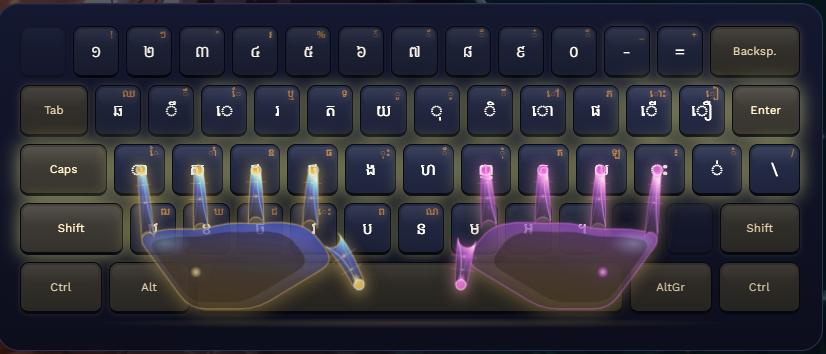
- Standard Anchor: ថ (F Key) & ញ (J Key) tactile index anchors.
- Coeng Mechanism: Unshifted Space triggers subscript stacking (Coeng ្); Shift + Space inserts visible space.
- Frequency Optimization: Base vowels and high-volume consonants on unshifted keys; / inserts ZWSP.
- Layers: Base, Shift, and AltGr (Right Alt) combinations (KBDKHMR.DLL).
Home Row Alignment
Architectural Features
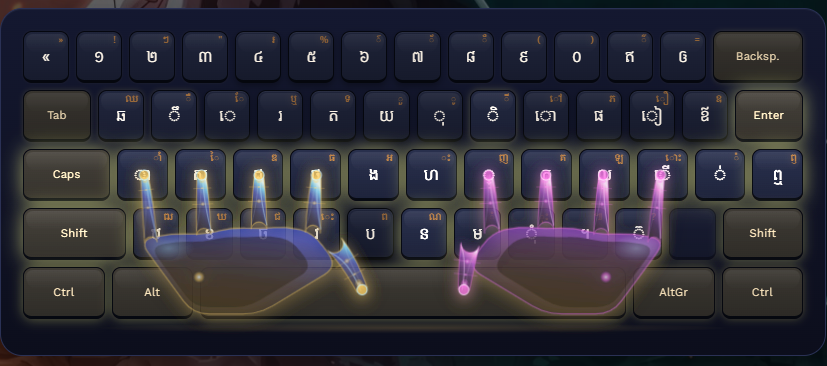
- Unicode Ergonomic Standard: Designed by Cambodia's National ICT Development Authority (NiDA).
- Coeng Key: Explicitly triggered via unshifted J (Coeng ្), while Shift + J types ញ.
- Dedicated Vowels: Shifted keys house common compound vowels (េះ, ុំ, ាំ) and independent vowels.
- Government & Academia: Widely adopted across modern operating systems, education, and public administration.
Home Row Alignment
Architectural Features
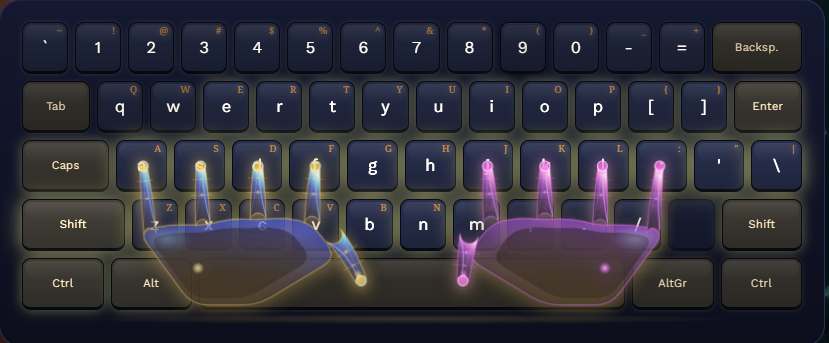
- Universal QWERTY: Standard ANSI 104-key physical mapping.
- Tactile Bumps: Primary index fingers on F and J.
- Dual Progression: 14 levels spanning alphabet, numbers, and coding symbols.
- Speed Training: Calibrated for pure high-speed touch typing without looking down.
Home Row Alignment
Khmer Typing Mechanics & Rules
#Understanding the grammatical order of the Khmer Unicode engine is critical for clean typing without broken glyphs or dotted circles:
Even if a vowel visually appears to the left of the consonant (e.g. ស្រៈ េ in គេ), you MUST ALWAYS type the base consonant first, followed by the vowel.
ក (K) + ា (A) = កា · គ (Shift+K) + េ (E) = គេ
To type a subscript consonant below another, press the Coeng trigger key, followed by the consonant to be subscripted.
Khmer Standard: ក + Space + ខ = ក្ខKhmer NiDA: ក + J + ខ = ក្ខ
Khmer text does not use spaces between individual words, but uses spaces between clauses or sentences. Press Shift + Space on both Khmer Standard and NiDA layouts to insert a visible space.
Modifier Layers Architecture
#Because Khmer has more than 70 unique graphemes, physical keys are partitioned across four modifier layers:
| Layer | Trigger | Contents |
|---|---|---|
| Base | None (type directly) | High-frequency consonants, common vowels (ា, ិ, ី, ឹ, ឺ, ុ, ូ, េ, ោ), Bantoc (់) |
| Shift | Shift (hold) | Secondary consonants (ឃ, ឈ, ឍ, ឡ, គ, ជ), compound vowels (ែ, ៃ, ៅ, ាំ, ំ, ះ), visible space |
| AltGr | Right Alt (AltGr) | Rare punctuation, Khmer currency symbol (៛), Camnuc Pikuu (៖), independent vowels |
| Ctrl | Ctrl (hold) | Specialized religious and archaic Khmer symbols |
Curriculum & Pedagogical Architecture
#The curriculum is structured across 40 levels, 222 handcrafted lessons, and 666 exercises. Every lesson is validated by automated CI audit scripts to enforce strict prerequisite ordering.
Begins with anchor keys (ថ, ក) and home row consonants, advancing through vowels, subscripts, diacritics, vocab, and paragraph challenges.
Follows NiDA typewriter ergonomics starting with home row anchors, J-key Coeng (្) combinations, and speed tests.
Home row anchors (F, J, D, K, S, L, A, ;), expanding to top and bottom rows, Shift capitals, numbers, and symbols.
Adaptive Practice Engine (Keybr-Style)
#Adaptive Practice is a continuous, intelligent drill generator inspired by Keybr. Rather than memorizing static paragraphs, the engine generates pseudo-words and real vocabulary targeting the learner's weakest letters.
| Engine Rule | Specification | Rationale |
|---|---|---|
| Mistake Penalty | -3% score per wrong stroke |
Quickly flags hesitation and inaccuracy without completely wiping out progress. |
| Fast Keystroke Gain (<300ms) | +5% score |
Rewards genuine muscle memory and fluid touch-typing response. |
| Normal Keystroke Gain (300–600ms) | +3% score |
Steady progression at comfortable typing cadence. |
| Slow Keystroke Gain (600–1000ms) | +2% score |
Recognizes correct identification while encouraging speed. |
| Very Slow Keystroke Gain (>1000ms) | +1% score |
Prevents stalling while nudging the learner toward confidence. |
| Strict 100% Unlock Gate | Next letter locked until ALL active letters = 100% | Prevents premature advancement. Learners must thoroughly master all current letters. |
| Continuous Flow | Zero popup modals between rounds | Maintains unbroken typing rhythm. Rounds advance automatically with subtle inline toasts. |
Interactive Practice Modes & Race
#Different learning styles require different practice environments. PK Khmer Type includes four dedicated modes:
Session Persistence Across Page Refresh
#A key architectural feature of PK Khmer Type is state resilience. If a user accidentally closes or refreshes the page mid-lesson, their exact state is seamlessly preserved:
- Active Keyboard Layout: Restores English, NiDA, or Standard layout pills and keyboard state.
- Active Lesson Runner: Restores the current lesson panel and hides the blank manuscript.
- Exact Character Index: Cursor stays at the exact keystroke index where the user left off.
- Mistakes & Timer: Preserves error count, accepted keystrokes, and remaining time limit.
- Target Key & Finger Glow: Re-highlights the target key and anatomic finger on the virtual board.
- Accordion Level Strip: Automatically scrolls to and highlights the active lesson card.
Web Audio Sound Synthesizer
#PK Khmer Type synthesizes its sound effects purely using the browser's native Web Audio API. Zero external audio files or bandwidth are required.
| Sound Effect | Synthesis Method | Acoustic Character |
|---|---|---|
| Key Click | High-pass white noise burst + resonant bandpass filter | Crisp mechanical switch tactile response (Blue / Brown switch feel). |
| Error Click | Low-frequency square wave (120 Hz) with rapid decay | Subtle dull thud alerting to mistakes without jarring the ear. |
| Chime / Burst | Sine wave chord progression with exponential gain envelope | Satisfying temple gong / bell chime on lesson completion. |
Frequently Asked Questions (FAQ)
#PK Khmer Type (ក្តារចុចខ្មែរ PK) is a free, browser-based interactive touch typing tutor built by student developer Phanna Kurosaki. It teaches the Khmer Standard keyboard layout, the official Khmer NiDA Unicode keyboard layout, and English (US) QWERTY across 40 levels, 222 structured lessons, and 666+ exercises, complete with a live virtual keyboard, 3D kinematic finger guide, and Keybr-style adaptive practice.
On the Khmer Standard keyboard layout, the right-hand index home key J types ញ and unshifted Space triggers the subscript sign Coeng (្). On the Khmer NiDA Unicode keyboard layout (designed by Cambodia's National ICT Development Authority), unshifted J directly triggers Coeng (្) while Shift + J types ញ, and shifted keys include dedicated compound vowels such as េះ, ុំ, and ាំ.
To type a subscript consonant (ជើងព្យញ្ជនៈ) below a base consonant, first type the base consonant, then press the Coeng trigger key (unshifted Space on Khmer Standard, or unshifted J on Khmer NiDA), and then type the second consonant (for example, ក + Coeng + ខ = ក្ខ). To insert a visible word/clause space on Khmer layouts, press Shift + Space.
Khmer dependent vowels (ស្រៈនិស្ស័យ) cannot stand alone in Unicode. When displayed in isolation on a keyboard key, a dotted circle (U+25CC) is deliberately added so the vowel mark renders clearly instead of collapsing into an illegible dot. In normal typing, always type the base consonant first and the vowel second so they combine cleanly without a dotted circle.
Yes! PK Khmer Type is a Progressive Web App (PWA). All layout definitions, audio synthesizers, 3D models, and 222 lessons are completely bundled locally in vanilla JavaScript. You can save or bookmark the page and practice with zero internet connection.
Open the Settings menu (or click the gear icon in the top right), then click "Export Backup (JSON)". You can import this file anytime to restore your completed lessons, stats, and badges on another computer or browser.